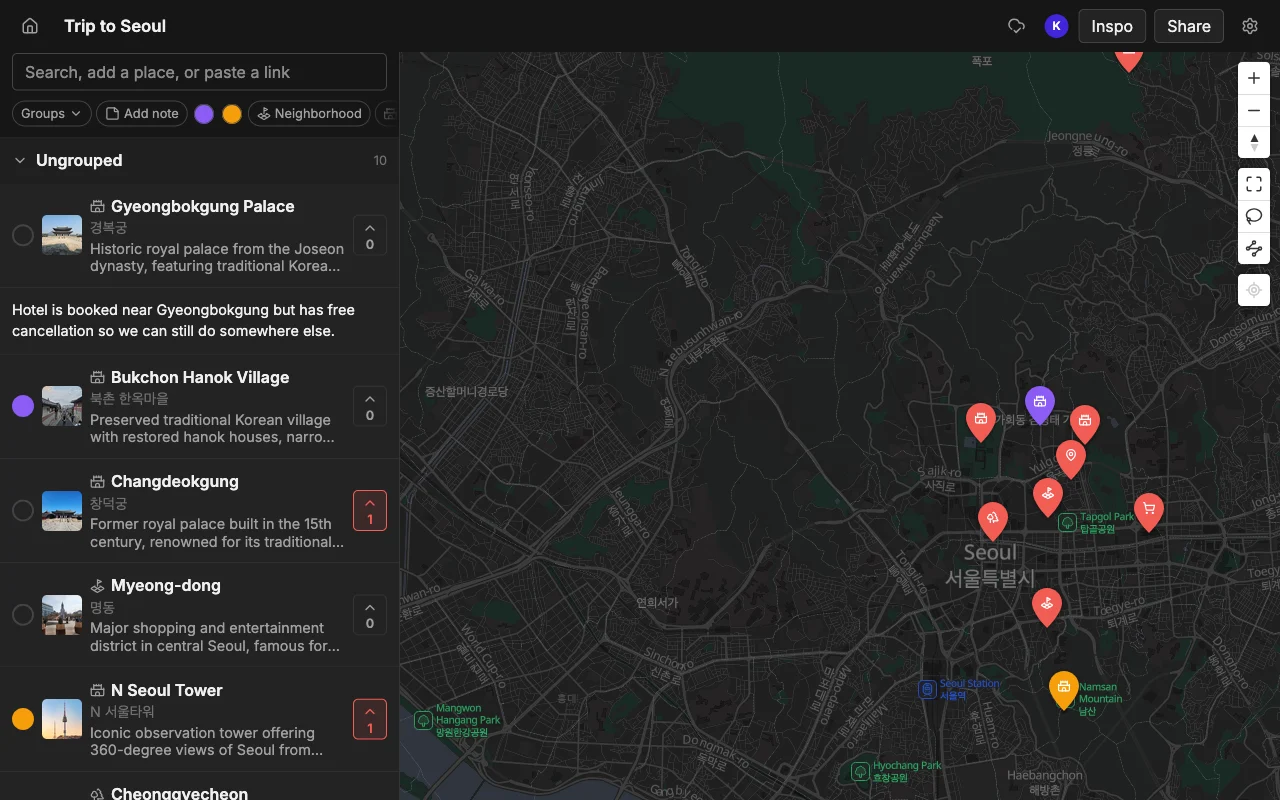
Places vs Notion and Google Docs for trip planning
Updated June 25, 2026
Plenty of people plan trips in a Notion template or a Google Doc. They're flexible, but they have no map and no idea what a place is. Places is purpose-built for places, with a real map and details filled in for you. Here's the comparison.
Where Places wins
- A real map. Places shows every spot on a map so you can see what's near what. Notion and Docs have no map view.
- Automatic place details. Search or paste a link and Places fills in the address, a photo, a description, and a color, ready for your note. In Notion or Docs you type all of that yourself.
- Import from social content. Turn a TikTok, a Reel, or an article into pins. A doc just holds text.
- Collaboration built for places. Real-time editing designed for spots, with voting and a note on each one.
- Made for your phone. Built to use while you're out, not a document you pinch-to-zoom on a small screen.
Where Notion and Google Docs wins
- Total flexibility. A doc can hold anything: budgets, packing lists, long free-form writing.
- Already in your workflow. If your group already lives in Notion or Docs, it's no new tool to learn.
Feature comparison
| Feature | Places | Notion and Google Docs |
|---|---|---|
| Map view | Yes | No |
| Auto place details (address, photo) | Yes | No, manual |
| Import from TikTok and links | Yes | No |
| Real-time collaboration | Yes | Yes |
| Free-form docs and budgets | A note per place | Anything |
| Share a public link | Yes | Yes |
| Mobile-first | Yes | Not really |
Which should you choose?
A Notion or Docs trip planner makes you do all the work yourself. Places fills in the details automatically and shows them on a map. Use a doc for budgets and free-form writing, and Places for the actual places.