Best travel planning apps in 2026
Updated July 11, 2026
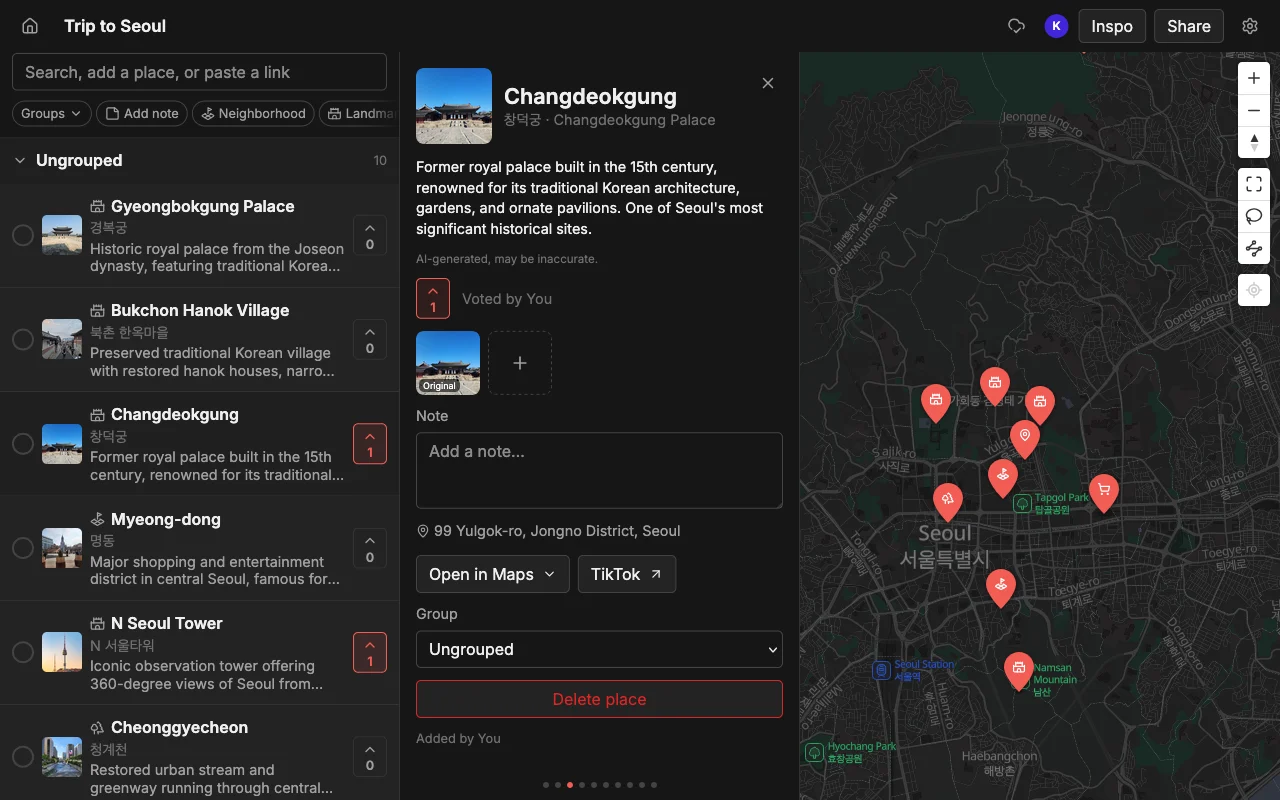
Travel planning changed in 2026, and most of the apps in the category have not caught up. For years it was split cleanly in two: heavy itinerary tools that assumed you knew every booking in advance, and simple map savers that assumed you would type each place in by hand. Both assumed you were planning alone. Neither assumption survives contact with how people actually travel now.
Today the inspiration arrives as video. You find a food tour on TikTok, a neighborhood guide on Reels, a “48 hours in Mexico City” on YouTube, and you save all three with no plan for what happens next. And the trip itself is a group effort, four friends across four phones, not one organizer with a spreadsheet. An app built for the old world makes you transcribe your saved videos by hand and then locks the plan to a single person’s device. An app built for 2026 turns those videos into pins for you and lets the whole group build the plan together.
So the honest way to rank travel apps this year is against those two shifts, plus the practical question of who can even open the thing. Here is how the main options compare, what each does well, and who each is for.
What to look for in 2026
Three things separate a modern travel app from a legacy one, and they are the axes worth holding every option against before you commit a trip to it.
- Social import, so you can paste a TikTok, Reel, or article and get pins instead of typing every place. This is the single biggest time-saver of the year, because it turns the videos you already save from a graveyard of bookmarks into an actual map.
- Real-time collaboration, so a group can build one map together instead of one person doing all the work. If the trip is going to be shared, the planning should be too, and that means live editing, not one person exporting a PDF for everyone else to comment on.
- Cross-platform support, so an iPhone user and an Android user can both take part. An app that only runs on Apple hardware quietly excludes whoever in the group did not buy in, which is a strange way to plan a shared trip.
Voting and a proper map-first view are the tie-breakers when two apps are otherwise close: voting so the group can decide, and a full-screen map so you can see the shape of the trip rather than squinting at half a screen.
Places, best for social import and planning together
Places is the one built around both modern criteria at once, which is why it leads this list. Paste a TikTok, a Reel, a YouTube video, or an article and it pins every place mentioned, each with a photo and a note. It finds every spot in the whole clip, so a ten-stop guide becomes ten pins in seconds, not one, and you can also add places by searching when a tip arrives by text instead of by video. The research that used to mean scrubbing through saved clips becomes a paste and a glance.
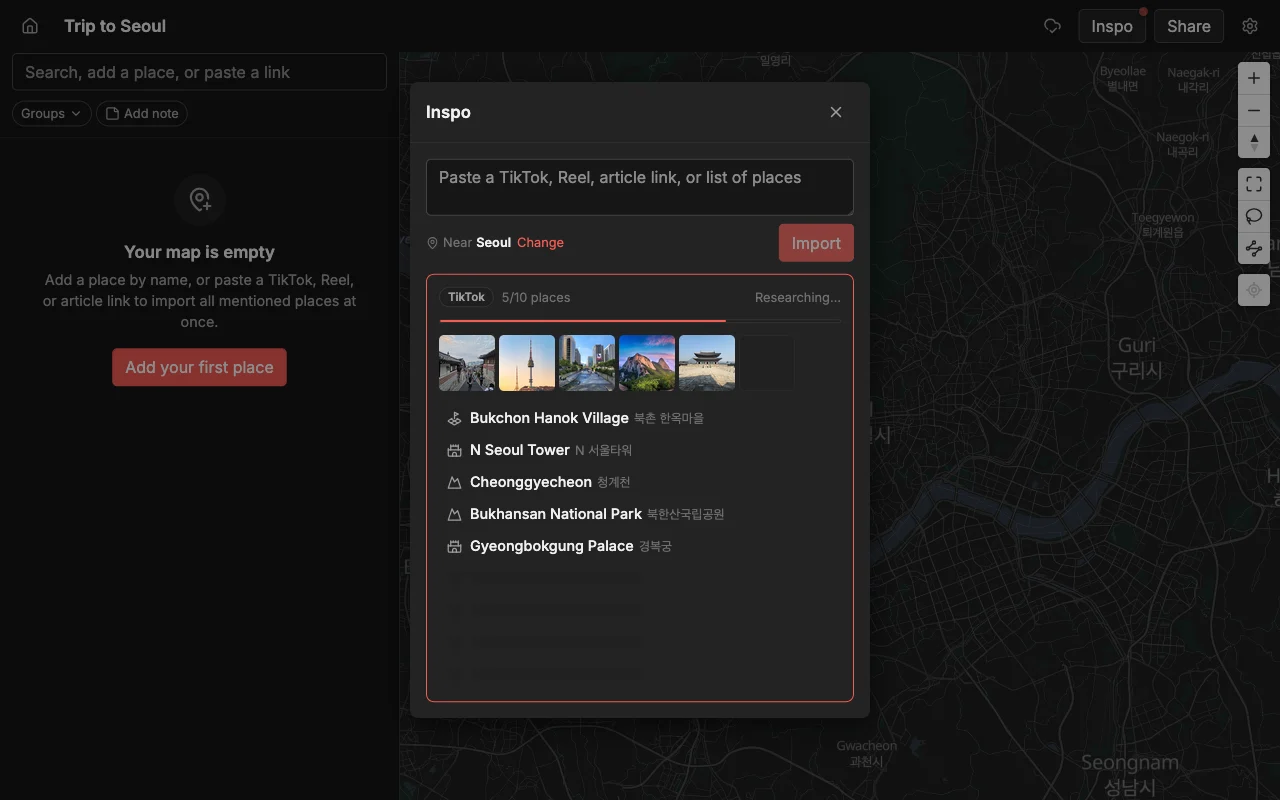
From there a group edits the same map live on the web, iPhone, or Android. Everyone’s changes appear in real time, so nobody is waiting on a refresh or wondering whose version is current, and the group votes on spots to decide together instead of arguing in a chat thread. Notes and colors on each place keep the context attached to the map, and a read-only link lets anyone look without an account. It is free to start, with unlimited maps, places, and collaborators. You can export a finished map to KML, CSV, or PDF when you want it elsewhere. That combination, social import plus real group planning across every device, is the specific thing the rest of the list gives you only in pieces. Best if your trip starts from social content and you are planning it with other people.
Wanderlog, best for logistics-heavy trips
Wanderlog handles the parts of a trip that are made of bookings: flights, hotels, and a day-by-day itinerary with driving times between stops, and it supports collaboration so a group can build the schedule together. When a trip is fundamentally a chain of reservations, a two-week road trip with a rental car and a hotel every night, that itinerary structure earns its keep and answers questions a plain map cannot.
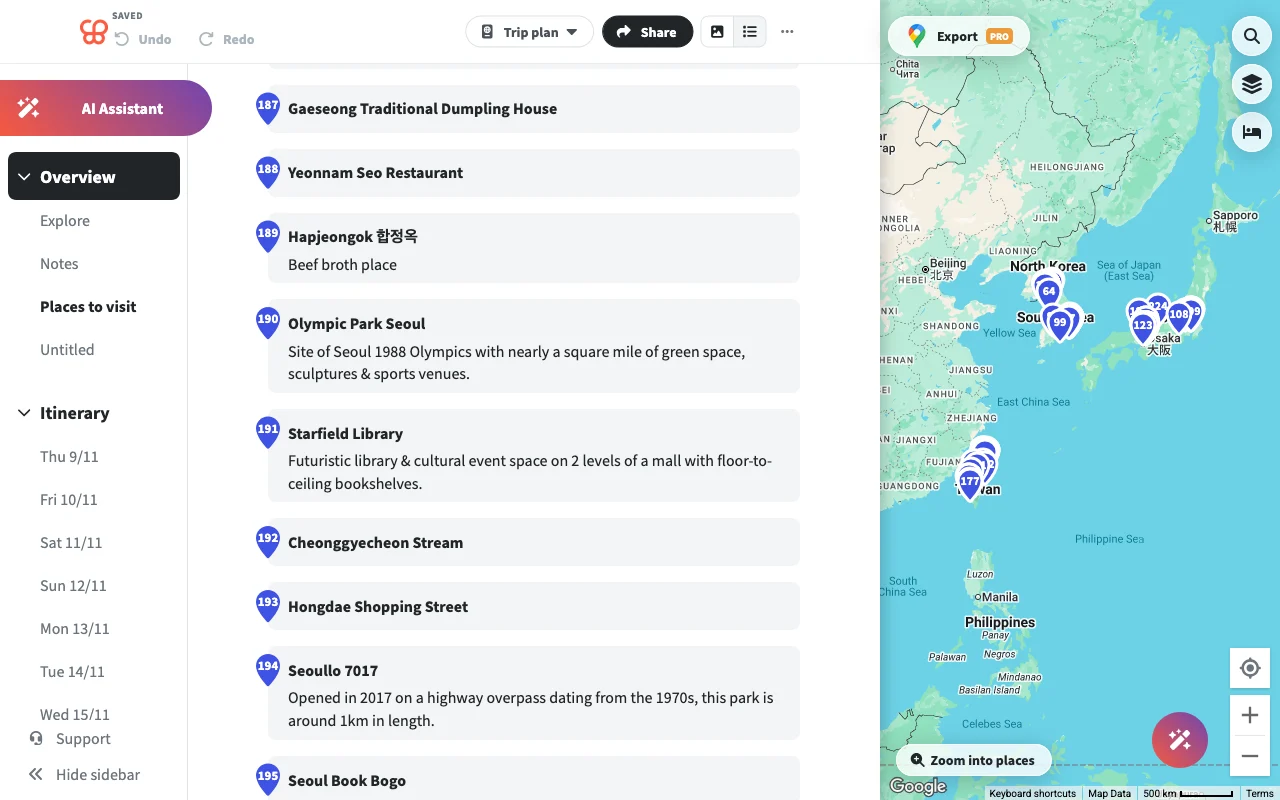
The gaps are the modern ones. It can lag on large trips once the itinerary grows long, it shows the map on only half the screen, so the geography is always slightly cramped, and it does not import from social videos, so every TikTok spot goes in by hand. It is thorough when a trip is mostly bookings and routing and less suited to the messy, video-fed brainstorming phase that now comes first. Best if your trip is mostly flights, hotels, and routing.
TripIt, best for managing bookings
TripIt does one thing and does it cleanly: it turns confirmation emails into a tidy timeline of flights, hotels, and cars. Forward your bookings, or connect your inbox, and it assembles them into an itinerary you can pull up at the gate without digging through your email. For a frequent traveler drowning in confirmation numbers, that is a real and specific relief.
But it is not a map and it is not a place planner. It organizes what you have already booked rather than helping you decide where to go, so it sits alongside a planning tool rather than replacing one. There is no social import, no collaborative map, and nothing to help a group choose between two neighborhoods. Think of it as the filing cabinet for your reservations, not the drawing board for the trip. Best if you mainly need reservations kept in order.
Tripsy, best for Apple-only travelers
Tripsy is an iPhone and Mac planner with good booking parsing. On Apple hardware it is fast and native, with solid handling of confirmation emails that turns bookings into a clean plan. If you live entirely inside the Apple ecosystem and plan mostly for yourself, it is a reasonable pick.
The boundaries are firm, though. It does not run on Android or the web, so a mixed-device group is out from the start, its collaboration is limited rather than a true live shared map, and it has no social import, so the TikToks and Reels stay stuck outside the plan. That combination fits a narrower audience than the rest of the list. Best if you are solo or everyone in your group is on Apple devices.
Mapstr, best for saving spots over time
Mapstr is a mature app for saving your favorite places and following the maps of friends, chefs, and publications. Its social layer is the draw: you can build a personal atlas of everywhere you have loved and follow the people whose taste you trust to see where they have been. As a long-term place library, it is well suited to that job.
For trip planning in the 2026 sense, though, it sits to the side. Its shared maps are add-only, so friends can contribute pins but only the creator can edit them, and it has no social-video import, so anything from a clip goes in by hand. That makes it a personal collection more than a group planner or a video-fed research tool. Best if you want to build a lasting map of places you love.
Plotline, best for iPhone-only social savers
Plotline is an iPhone app that imports from TikTok, Reels, and YouTube and has a swipe-to-plan day feature that stitches your saved spots into a route for an afternoon. On its home platform it is fast, and the multi-source social import is a real strength that puts it ahead of the older apps for turning video into pins.
Its limits are reach and stage. It has no web or Android app yet, so anyone off iPhone cannot join, and full collaborative planning is still on the way rather than shipping today, which keeps it firmly a solo tool for now. As a personal saver for one iPhone user, it is a strong pick, but it is not yet the app a mixed group builds a trip on together. Best if you are a solo iPhone user who wants a fast saver.
The bottom line
If everyone is on iPhone and planning solo, several of these work well: Tripsy for an Apple planner, Plotline for a social saver, TripIt for keeping bookings straight, Wanderlog for a booking-heavy itinerary. Each is a reasonable answer to a narrow question, and if your trip matches that question, take it.
But the question that defines 2026 is broader than any of those: a group on a mix of devices, building one live map from the places they keep finding on social media. Social import, real-time collaboration, and cross-platform access, all at once, is a demanding combination, and it is the exact intersection where Places stands alone. If that describes your next trip, the choice narrows to one. If it does not, the honest answer is that a more specialized tool may serve you better, and this roundup points you to it.
Frequently asked questions
- Which app is best for a group?
- Places, because everyone can edit one live map and vote on any device, whether they are on iPhone, Android, or a laptop. Most of the others are single-user or Apple-only, which quietly leaves someone out of a trip they are supposedly helping plan. For a deeper look, see the best apps to plan a trip with friends.
- Which of these import from TikTok and Reels?
- Places, Plotline, and JoySpot import from social video, so you can paste a clip and get pins. Wanderlog, TripIt, Tripsy, and Mapstr do not, so with those you add every place from a video by hand.
- Which works on Android and the web?
- Places runs on the web, iPhone, and Android. Plotline and Tripsy are Apple-focused, and Mapstr is app-only, so if your group spans devices, that narrows the field quickly.
- Do I need to pay to plan a trip?
- Places is free to start with unlimited maps, places, and collaborators, so a whole group can plan without a paywall in the way. The others range from free tiers to paid subscriptions, so check each before you commit.
- What is the difference between a planner like Wanderlog and a map like Places?
- Wanderlog is built around a day-by-day itinerary of bookings and drive times, best once the trip is largely decided. Places is built around a live, votable map fed by social imports, best while the group is still gathering ideas and choosing between them. Many people use one for the messy early phase and the other for the booked-and-scheduled one.
- Can I get my plan out of the app if I switch tools?
- With Places you can export any map to KML, CSV, or PDF, so your places are portable and never trapped in one app. That is worth checking with any tool before you pour a whole trip into it.